From VSCode to Coder: My 2025 Tablet‑Coding Adventure (with a Proxmox Home‑Lab and Terraform Fails)

Let me give this new blog format a try. My AI says that this is better for SEO 😆
1. The Long‑Haul Intro – Why I’m Still in VSCode
When I first announced my “new IDE” in the last blog, I promised you a deep‑dive into something that would keep my brain ticking like a metronome. The reality? I’ve been stuck in the VSCode lane, sipping coffee and re‑using other people’s Terraform playbooks like a tired DJ playing the same vinyl over and over.
“If Cursor has the AI, why am I still clinging to the manual side of the keyboard?”
Because I run my own LLM servers and plug them into VSCode via Continue.dev, that’s fine. But if I switch to Cursor (or the next shiny AI IDE) without mastering AI‑coding first, my boss will hand me a lifetime plan and a replacement dev with a lifetime subscription in the pocket. No, I won’t let that happen.
2. VSCode: The Familiar, The Comfort, The Curse
I’ve been using VSCode since 2019, and it is still my primary and only coding workstation to date. I remember the first time I opened the “Problems” panel and found my entire workspace in red. Compared I learned a lot of coding practices and languages, but I am still using VSCode.
Cursor, Claude, Windsurf—they all promise an AI‑powered future that feels like you’re surfing on a neural‑network wave. I’m still in the “manual transmission” zone: my own LLM server, Continue.dev, and a local machine that can run any code. The cost‑benefit? It’s cheap, but the time benefit is low.
VSCode is still one of the best IDEs for beginners and professionals, don't get me wrong.
3. The time benefit
I just recently started my career as a DevOps engineer, but lately my progress has been as flat as a pancake. I spin up a fresh Proxmox day job, run a demo script, and feel like I’m already “done”. I’m stuck re‑using someone else’s Terraform playbooks instead of mastering IaC. Most of the example Terraform playbooks online are for AWS. AWS costs are a nightmare—my bank account refuses to let me buy another EC2 instance just to learn IaC.
The dream:
“If I can push my own Terraform stack to the cloud, I could finally code with anything and from anywhere.”
That dream was alive and kicking when I discovered Coder—a self-hosted environment that can consume my Proxmox cluster.
4. Cursor vs. Coder – The “AI‑IDE Showdown”
Cursor feels like a futuristic cockpit: AI suggestions, live inference, the works. It’s a great learning tool for those who can afford it. Coder, on the other hand, is the back‑office of an IDE: it’s lightweight, web‑based, and you can spin up workspaces that look just like VSCode on a browser.
“Cursor gives me a flashy, AI‑themed experience, but Coder keeps it simple, letting me harness my own hardware.”
I kept my VSCode, added a Continue.dev LLM server, and that was my baseline. Cursor was tempting, but I feared a lifetime subscription would outclass my skill level in days, if not weeks.
5. The Terraform Trials – “I Didn’t Understand the Provider”
Terraform is an IaC playground that I have not mastered. The Coder community is small, so the templates are rarer than a unicorn. Most out‑of‑the‑box ones are for AWS, GCP, or Azure—my budget didn’t allow for that. I needed a home‑lab version.
I found a Proxmox‑based Coder template in the Coder registry. The first attempt looked like this (simplified, because you don’t want to copy the entire repo):
terraform {
  required_providers {
    coder = {
      source = "coder/coder"
    }
    proxmox = {
      source = "bpg/proxmox"
    }
  }
}

provider "coder" {}

provider "proxmox" {
  endpoint  = var.proxmox_api_url
  api_token = "${var.proxmox_api_token_id}=${var.proxmox_api_token_secret}"
  insecure  = true

  # SSH is needed for file uploads to Proxmox
  ssh {
    username = var.proxmox_ssh_user
    password = var.proxmox_password

    node {
      name    = var.proxmox_node
      address = var.proxmox_host
    }
  }
}
This snippet was the first time my heart did a double‑backflip. “Oh no, the provider is not working!” I hit the “Oh no” button on my coffee mug, blamed the AI tools, and tried again.
As it turns out, the bpg/proxmox provider is not working great with Proxmox VE 8.3. For those who are still looking for an answer, try telmate/proxmox version 3.0.2-rc05. This proxmox provider works great for me.
6. The iPad Odyssey – A Tablet as a Full‑Featured IDE
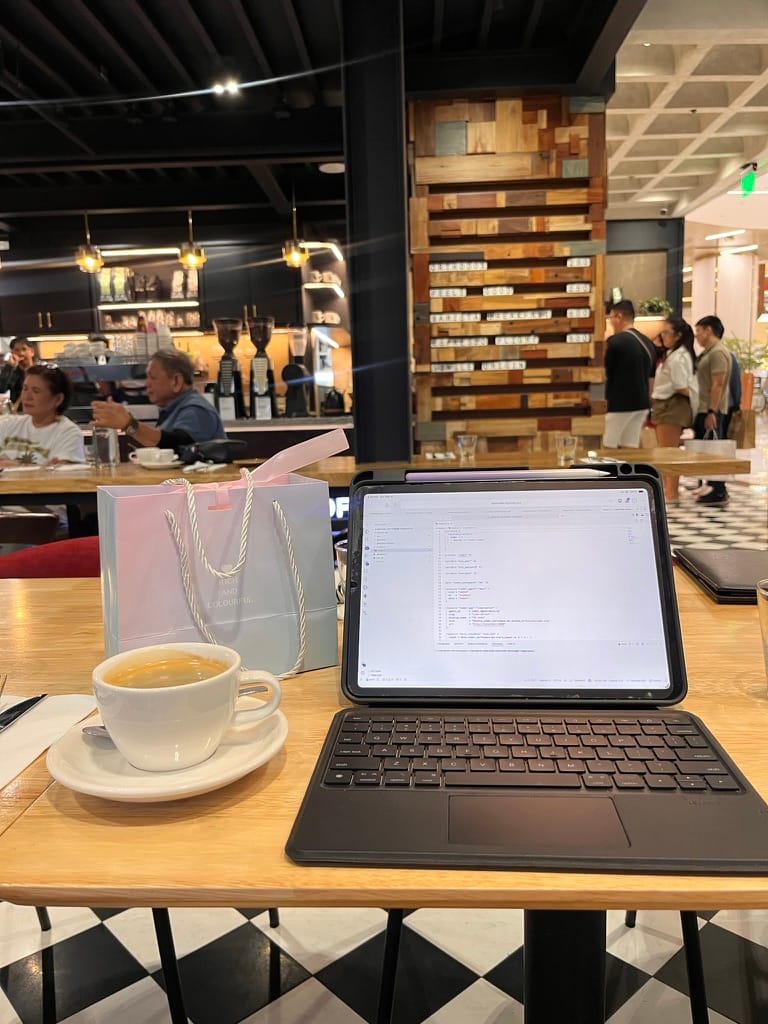
Picture this: I’m in a bustling coffee shop in Manila, my iPhone in one hand, my iPad Air M1 in the other. No laptop, no cables—just a browser that opens my Coder workspace. I’ve never needed to mirror a desktop; that would be like carrying a rotary phone in 2025.
The iPad is my new workstation. The best part? The screen’s touch gestures feel like a code‑ic adventure. “Who needs a desk when you have a barista’s chair?” – my favorite pun.
But puns aside, here is another “I'm not an AI-proof picture.” Last weekend I strolled through Quezon City at their new mall, Opus Mall. I can be found having coffee while editing code on my iPad. Traveling light but still being able to conduct work remotely. Nicely done 🫡
7. The Coder Deployment – From Terraform to Live Workspace
7.1. Deploying the Coder Server
I started with a cheap 4‑core, 8 GB RAM Linux machine with Docker installed that I’ve been using as a hobby server. The steps were:
- Install and start Coder Server with the instructions from https://coder.com/docs/install/cli
- Create a new Terraform-based template for the Coder. Use Docker (Devcontainer) by Coder. We can find ready-made templates at the Coder registry or at this awesome Coder repository.
- Create a new workspace with the template
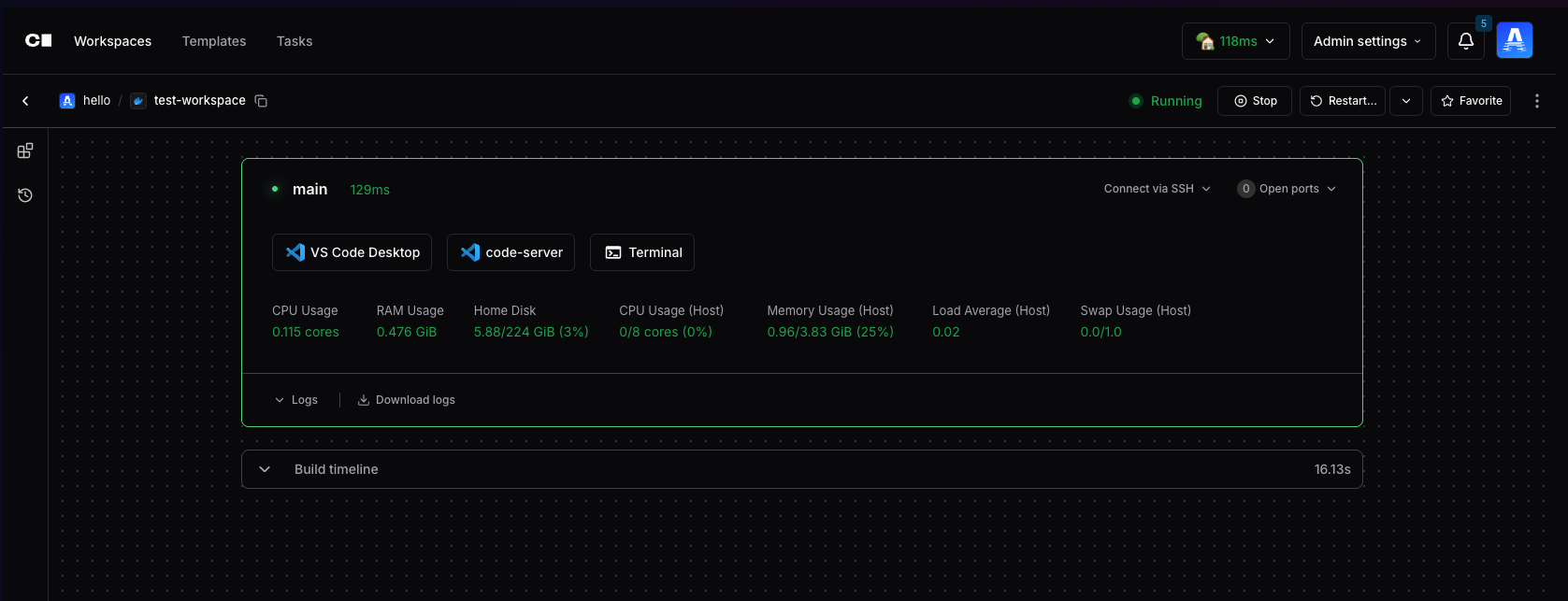
- Watch your workspace being provisioned and launched
Once the server boots, Coder hands me a free trial domain: https://url***.try.coder.app/. The latency is about 500 ms—acceptable for most devs, but since I have my own relay deployed in Singapore, I used that instead, and I'm getting around 100ms, which is pretty good.
Now I have a workspace with web-based VSCode and a terminal built in that is accessible anywhere. Now go to the nearest Starbucks (not sponsored btw 😆) and code with your iPad.
7.2. The “Mac Mini” Side‑Quest
I haven’t fully mastered IaC, but I’m a fan of isolation. My Coder environment is nowhere near perfect. I can probably spin up a Windows-based workspace later, but not a macOS-based workspace. Because my server runs with x86-based hardware and macOS does not run with x86 anymore. The Mac Mini is my “future MacOS workspace”—a cheap way to run Coder on macOS. I’ll keep a note to buy a couple next year.
7.3. The LLM Server and Continue.dev Integration
I keep my own OpenAI‑style LLM server. In the Coder workspace, I'm still gonna use VSCode, just the web version. But since this is a specialized version of VSCode on the web, Continue.dev and any other extension are still compatible. When I start a file, I hit the “Chat” icon, and it auto‑suggests completions using my LLM. This keeps the cost down and speeds up.
8. The “Why Not Use AWS?” – Cost, Speed, and the Control Factor
Many dev‑ops engineers start leaning on AWS, GCP, or Azure because they’re cloud‑native and come with built‑in scaling. My budget doesn’t. Also, the latency and data‑transfer costs are a nightmare. Instead, my Proxmox cluster is right under my control.
- Cost: $0.02 per CPU‑hour on a home server vs. $0.35 on an EC2 instance (just an example).
- Speed: 500 ms to the trial domain is fine, but a self‑hosted relay brings it down to ~100 ms.
- Control: I can spin up as many workspaces as I want, no more than I can afford.
9. The “Lifetime Plan” Dilemma – The Real Risk
If I didn't simply drop Cursor, I could be instant ahead in terms of AI suggestions, but my boss will replace me if I don’t have the lifetime subscription level. I’m still learning, still testing.
“I need to master AI before I trade my manual machine for Cursor’s shiny autopilot.”
As a full-stack engineer, I believe that this is the right track. So here I am at the end of 2025, I can confidently use and integrate AI into any project that life would like to throw at me 😆. But jokes aside, my local AI is being used not just as my coding assistant but also in automation, personal AI agents, home security, research, and many more.
10. Day‑to‑Day Life in the Coder‑Proxmox‑iPad Stack
10.1. Morning “Check‑Ins”
- I wake up 🛏️
- Brew coffee ☕
- Catch a breather outdoors 🏖️
- I log into my Coder workspace with my iPad 💻
- Continue to develop my project while sipping my coffee outdoors ✍️ ☕
10.2. Late‑Night “Fails” and AI‑Backed Fixes
I still hit fails—“unknown resource” errors, “proxmox not reachable” warnings—but the Continue.dev integration keeps the pace steady. When the server fails, I push a quick git pull to my template repo and hit terraform apply again.
“Each fail was a lesson, each success a triumph—this is how dev‑ops grows.”

11. The “Why I’d Never Return to the Laptop” – A Real‑World Reason
This is probably one of the clickbait-est titles ever. But for a good reason. If I can code on an iPad while traveling, why even consider a laptop‑only mindset? Because the cost–benefit ratio is higher. I save on electricity, on the cost of a laptop that I don’t need, and on the time I spend waiting for my cloud provider to spin up a VM. I’ve learned that the manual side of the IDE is still powerful, but I can automate that power with my own stack.
“If I can spin up a VM in minutes and code on an iPad, I’ve solved both the cost and time problem.”
Just imagine that I don't need to buy the most expensive MacBook Pro out there just to be competitive. If you are like me, a hybrid full-stack engineer, a DevOps, a techy guy, why not build a home server using desktop components that are a lot cheaper than laptops?
And with a Coder, I can code using:
- ✅ an iPad, or an Android tablet if you want
- ✅ Samsung phone connected to an external monitor with DEX
- ✅ someone else's laptop, because why not? You don't have to reinstall npm and VS Code to start working. Just go to your web console, log in and resume working!
12. The “Code‑ic” Future – A Look Ahead
12.1. Adding an AI Layer to the Coder Stack
I’m not ready to give up on AI just yet. The plan is to add a lightweight AI layer on top of the Proxmox cluster—using the LLM server I already run. The future will be hybrid: the AI will help me write code, but the infrastructure will stay in my hands.
12.2. Expanding the Proxmox Cluster
I will eventually add more nodes—so that I can run a full stack of workspaces simultaneously on an iPad, or even on a desk‑locked laptop. The only constraint? Power—but that’s not a problem. Didn't I mention? My tech stack expands from the software side to the hardware side. I'm not scared to be electrocuted. I have my own solar-powered setup that powers my servers during the day. Talking about green energy 🍃🍃 🍃
13. Take‑away Checklist – Are You Ready to Start?
- Get a cheap server or your old gaming PC.
- Set up Proxmox on a home‑lab cluster.
- Set up a VM For Coder Server.
- Pull the Coder Installer from the Coder website.
- Run Coder (
coder server) and use the free trial domain. - Start your first Workspace
- Add your own LLM server (e.g., OpenAI‑style).
- Integrate Continue.dev or a local extension into VSCode (optional).
- Try it out on a tablet in a coffee shop—if you don’t have a laptop, you’re already halfway there.
14. Final Word – The “Manual” Still Feels Automatic
I’ve finally moved from a laptop‑only mindset to a “workspace‑only” mindset—I can spin up a new environment with Terraform and continue coding on an iPad. The journey was long, filled with failed provider errors, coffee‑stained notebooks, and nights spent debugging a Coder module that didn’t work the first time.
“If Cursor is the flashy AI cockpit, Coder is the control‑tower that lets me run the show on my own hardware.”
So the next time you feel stuck in a VSCode‑only world, ask yourself: Do you need to re‑use Terraform playbooks or actually master the infrastructure? My hope is that this post—filled with real‑world failures, cost‑saving hacks, and a pro‑worked cluster—will give you the confidence to start a new IDE or even start a new cluster of your own.
Happy coding, whether it’s from a desk or a barista’s chair! 🚀