Axios NPM Package Hacked: What Every Developer Needs to Know (And How I Nearly Got Hit)

Hiiiiiii!! 👋
Let me start with something that literally made my heart skip a beat. And no, this isn't an April Fools' joke—even though the timing was perfect.

The Encounter
I was doing a simple yarn install in my TESTCODER environment (my isolated development sandbox) on April 1, 2026 around 1:56 PM GMT+8. Then out of nowhere—while yarn was still pulling packages—Windows Defender alerted me:
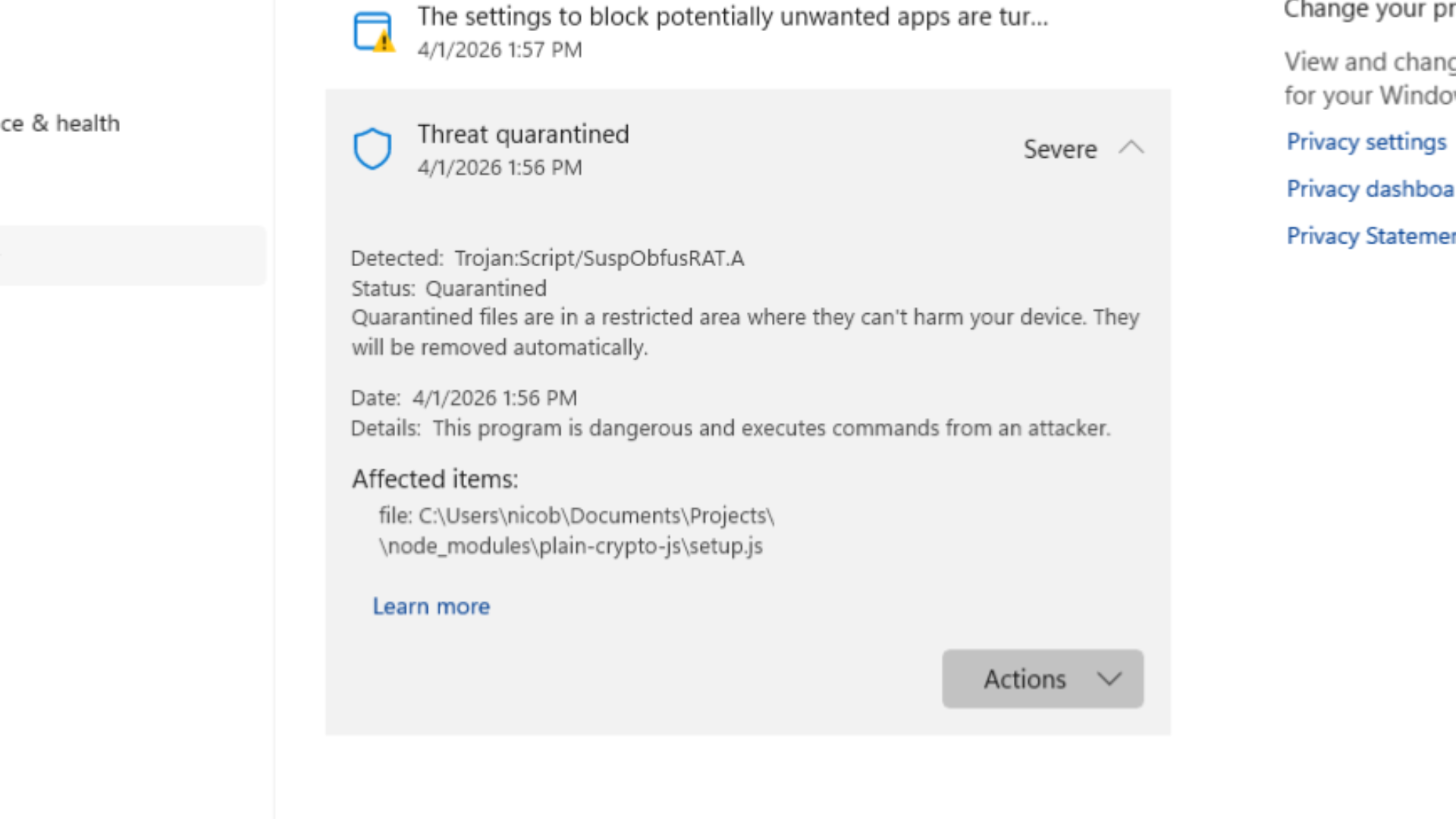
A trojan. In axios. The HTTP client library I've been using happily for years.
"But wait," I thought. "Axios? That rock-solid library with millions of weekly downloads?"

Yeah. That axios.
The file path made it obvious—plain-crypto-js sitting inside node_modules. That's not supposed to be an axios dependency.
What Actually Happened
On March 31, 2026 (and bleeding into the early hours of April 1), a threat actor successfully compromised the axios npm package. And we're not talking about some obscure dependency nobody uses—axios sees over 183 million combined weekly downloads.
How the Attack Unfolded
The attacker didn't need to find some zero-day vulnerability in axios itself. That would've been too much work. Instead, they went for the path of least resistance:
- Compromised a maintainer's credentials - A lead maintainer's account was breached
- Swapped the email - Changed it to an attacker-controlled ProtonMail address (
[[email protected]](/cdn-cgi/l/email-protection)) - Published poisoned versions directly - Bypassed GitHub Actions entirely, pushing
axios@1.14.1andaxios@0.30.4via npm CLI
According to theNetworkChuck's axios-attack-guide, these are the confirmed malicious versions.
The malicious versions included a dependency called plain-crypto-js. This package does absolutely nothing useful—its only purpose is to act as a delivery mechanism for WAVESHAPER.V2, a multi-platform Remote Access Trojan (RAT).
The plain-crypto-js Trojan Horse
Here's where it gets clever (and terrifying):
- Postinstall Hook Abuse: When you run
npm installoryarn install, npm/yarn automatically executes the postinstall script. No user interaction needed. - Obfuscated Dropper: The script (
setup.js) deobfuscates itself at runtime - Platform-Specific Payloads: Whether you're on Windows, macOS, or Linux, you get a custom backdoor
- Forensic Anti-Analysis: After execution, it cleans up after itself—deleting artifacts and replacing its own
package.jsonwith a clean version
If that sounds sophisticated, that's because it is. Security researchers have attributed this campaign to UNC1069, a financially motivated North Korea-nexus threat actor active since at least 2018.
What WAVESHAPER.V2 Can Do
This isn't just a "script kiddie" piece of malware. It's a full-featured RAT:
- Reconnaissance: Extracts hostname, username, OS version, process lists
- File System Enumeration: Recursively searches directories, returns detailed metadata
- Command Execution: Arbitrary shell commands and in-memory PE injection
- Backdoor Commands:
kill,rundir,runscript—remote control over yourmachine - C2 Communication: Contacts
sfrclak.com(IP: 142.11.206.73) for instructions
What Happened on My End
So there I was, running yarn install on April 1, 2026 at 1:56 PM GMT+8. Yarn was still pulling packages when Windows Defender popped up with the detection.
Here's why I'm confident I wasn't affected:
- Windows Defender caught it mid-execution - The moment it detected
Trojan:Script/SuspObfusRAT.A, it quarantined the fileimmediately. Yarn install stopped right there—mid-process. The postinstall script never finished running. - No malware artifacts created - I checked for the known file indicators (
%PROGRAMDATA%\wt.exe, temp directories). Nothing was there. - No C2 traffic - Checked my Pi-hole logs and router logs. No outbound connections to
sfrclak.comor142.11.206.73. The payload never got a chance to call home. - TESTCODER is a separate VM - Even if something had executed, it would've been contained within that isolated environment. Not my daily driver.
- Immediate response - Within seconds of the detection, I took down the entire TESTCODER environment VM. No hesitation.
Still, I'm not taking chances. Here's what I did after:
- Rotated ALL credentials - Every API key, every token, every secret
- Blocked C2 traffic at the network level - Added
sfrclak.comand142.11.206.73to my router's blocklist and my Pi-hole DNS sinkhole - Following the comprehensive guide at theNetworkChuck/axios-attack-guide
The lesson: Isolation + built-in security tools + immediate action = you might just survive a supply chain attack.
Had I been working directly on my main machine? Different story. The RAT could've been running without me even knowing.
The Timeline Discrepancy
Here's the thing that concerns me: news reports said the malicious versions had already been removed from npm. But at 1:56 PM April 1, GMT+8, I was still able to encounter the infected version on my end.
How?
Different mirrors, caches, and CDN propagation times can cause delays. When npm removes a package version, it doesn't instantly disappear from every edge node. If your client pulls from a slower-updating mirror, you might still get poisoned packages hours after the takedown.
Assume nothing is safe until you've verified.

Am I Affected?
If you've installed axios recently, check these indicators:
Malicious Package Versions:
axios@1.14.1axios@0.30.4plain-crypto-jsdependency (any version)
Network Indicators:
- C2 Domain:
sfrclak.com - C2 IP:
142.11.206.73
File Artifacts:
- macOS:
/Library/Caches/com.apple.act.mond - Windows:
%PROGRAMDATA%\wt.exe - Linux:
/tmp/ld.py
For a comprehensive check, I highly recommend following this guide: 👉 https://github.com/theNetworkChuck/axios-attack-guide
This repository contains detailed instructions and scripts to scan your systems thoroughly if you suspect exposure.
Recommendations: First Aid for Your npm Installs
If this attack proves anything, it's that blind trust in package ecosystems is dangerous. Here's what you can do right now:
1. Use Your Lockfile as a Shield
Before running npm install or yarn install or pnpm install, make sure you're using your lockfile (package-lock.json, yarn.lock, or pnpm-lock.yaml). This prevents the package manager from fetching the "latest" version of dependencies.
npm ci                      # For npm
yarn --frozen-lockfile      # For Yarn
pnpm install --frozen-lockfile  # For pnpm
These commands use your lockfile exactly as-is. No surprises.
2. Pin Your Versions in package.json
Instead of:
{
  "dependencies": {
    "axios": "^1.14.0"
  }
}
Do this:
{
  "dependencies": {
    "axios": "1.14.0"
  }
}
Notice the missing ^ or ~? That's intentional. It tells npm: "I want exactly this version. Don't try to be smart."
3. Safe Versions Right Now
According to the axios-attack-guide, the bad versions are:
axios@1.14.1axios@0.30.4
Downgrade immediately if you've installed either of these. Check npmjs.com/package/axios for the latest safe versions.
npm install axios@latest
Or pin to a specific known-safe version.
4. Rotate All Credentials
If you suspect exposure, assume compromise. Rotate everything:
- API keys
- Database credentials
- SSH keys
- Environment secrets
- Any tokens stored in
.envfiles
5. Block C2 Traffic at the Network Level
Don't just rely on your machine's firewall. Block the known C2 endpoints at your network edge:
- Add
sfrclak.comto your router's blocklist - Sinkhole
142.11.206.73in your Pi-hole or DNS server - Check your firewall/network logs for any outbound connections to these indicators
6. Harden Your CI/CD Pipelines
In CI environments, consider running:
npm install --ignore-scripts
yarn install --ignore-scripts
This prevents malicious postinstall hooks from executing. The trade-off: some packages legitimately need postinstall scripts for setup. Weigh the risk.
7. Use a Separate Development Environment
This one saved me. TESTCODER runs in isolation. If malware gets dropped there, my personal machines remain clean. If you don't have a separate dev environment, consider:
- Containers (Docker)
- Virtual machines
- Cloud dev environments (GitHub Codespaces, Coder, etc.)
- A dedicated "sacrificial" machine 😆
The Bigger Picture: Supply Chain Attacks Are Here to Stay
This isn't the first supply chain attack, and it won't be the last. Remember:
- event-stream (2018)
- ua-parser-js (2021)
- colors and faker (2022)
- now axios (2026)
Supply chain compromise is particularly dangerous because it abuses inherent trust. We trust that npm install axios gives us the real axios. We trust that maintainers' credentials haven't been compromised. We trust that the package we installed yesterday is the same today.
But that trust is exactly what threat actors exploit.
Final Thoughts
I got lucky. TESTCODER's isolation separated my development work from my personal machine, and Windows Defender caught it before anything could execute. But not everyone has that setup.
If you're reading this and you install packages directly on your main machine—your daily driver with all your personal files, passwords, and projects—please reconsider your workflow. At minimum:
- Use lockfiles religiously
- Pin your versions
- Consider a separate dev environment
- Block known C2 at the network level (Pi-hole helps!)
The convenience of npm install isn't worth the risk of a RAT silently running on your system.
Until next time! 🚀